Sunday, June 23, 2019

Life in New Zealand

We have been rather busy!

About 7 months ago we moved our family back to New Zealand, and we're now living in Milford on the North Shore of Auckland.

It has been a great experience, the kids are in a new school, we are close to the 8 other cousins who come around and play often. Both sets of grandparents are around to help and to enjoy having everyone back in the country again. My brother in law is also back in NZ with their 2 kids after 10 years in Hong Kong.

So it was 11 years in London in the end - a bit more than the 2 or 3 we planned, but we have some great memories and a lot of work experience over there.

Anne's company Orion Health relocated us, which was nice as our shipping would have cost a lot (about half a container), compared to the 2 suitcases each that we had 11 years ago.

I have set up a digital agency specialising in lead generation for businesses using chatbots and more specifically Facebook Messenger. I have been working with ad campaigns, Facebook APIs and eCommerce for so long now it was time to switch to helping other businesses, and it seems the perfect time to do so with such amazing opportunities through messenger opening up to businesses. My website is http://prosper.nz which is a great domain for NZ and one that numerous companies have tried to buy off me while I've been away - finally time to make good use of it.

So if you're in New Zealand, look us up!


Here is a photo if Milford beach, just down the road - my runs in the morning are spectacular.

An ad for home builders

You build it... I'll help you find people to move into it! You probably already know this, but most Home builders are...

Posted by Prosper Technologies Ltd on Saturday, 22 June 2019

Monday, May 15, 2017

360 Degree Google Map Walkthroughs

I've been working with a Gear 360 camera to make 360 degree walkthroughs for businesses. Here are some examples:

Third Door Workhub & Nursery
(if you can't see this, view on ProsperTech Blog)

Made.com Showroom
(if you can't see this, view it on ProsperTech Blog)

Lots of fun connecting up the dots and ensuring the flow works well.

Wednesday, October 12, 2016

Code for the Kingdom 2016

I have taken a back seat from constant meet ups and hack weekends the past few years - I started The London Web a group which has 4800 members and counting… Kids are now the priority without grandparents around for us in London - getting out to London when you’re based close to the school run can prove quite difficult to co-ordinate.

I am fortunate enough to have combined my Christian faith with my passion for code and web application development - for the past 3 years I’ve been building and maintaining Lepton - a church giving app.  I’ve been doing web development for 20 years, but only just 3 years ago got the chance to do this for the thing that I’m most passionate about - my faith and love of Christ and his church.

Many have this perception that it is the clergy - the church leaders, that have the main role to play - that’s not quite true.

As christian developers and technology professionals, I believe we play the most important background scene in this technology based world. 

The church is about communicating Christ and his message - before I was a teenager, computers were for insular activities - your own games, your own code - then the internet came and every bit of our Communication sphere has changed - now the church is still in many ways in the dark ages - well we have at least moved on from OHP’s (Over Head Projectors) - and we have computers for things now - and you get emails - wow that’s a change - 

For most churches, their IT department is under-utilised, a bit of a mess to be frank - IT contractors are expensive, and IT is a bit ‘ad-hoc’. We have a major role to play over the next few years to ensure the church “Gets with the times”..

Join me and other christians in tech - and we’ll change this - co-ordinate visions, work out our passions, our interests, and apply them to our faith..

The Code For the Kingdom Hack weekend is the second EVER in London - the first year, 

 = Voice Recognition Slide Transitions
 = iBeacons for the homeless - give to them without risk of them using your money for alcohol and drugs.
 = Refuge Homes - a registry of the places UK refuges can be accommodated by our communities
 = Prayer app collaborations
 = just a few to spark your interest.

This year I’m planning on hitting the ground full force with coding tools I am totally familiar with - last year I tackled Django for just the second time and it was a bit much - this year the code will be cranked out with passion through the night - and I’ll still probably get more sleep than when my kids are around!


Search “Code for the Kingdom” and get your tickets - it’s a global event with 16 cities taking part on one weekend ! It’s on the 21st to the 23rd of October 2016 - it’s going to be awesome!


Tuesday, September 01, 2015

Hack Weekend Plans

As a group of Christians in tech, about 10 of us have been meeting for a number of months to plan a Hack Weekend in combination with 13 other cities around the world. It's called Code For The Kingdom, and the London base will be on the 2nd of October 2015 starting Friday evening and ending Sunday afternoon.

I thought I'd share some of the vision behind it:


  • We are quite silo'd as a community of Christian techies, and even in a larger church such as HTB there are surprisingly few of us. This is about meeting others with the same visions and faith as ourselves.
  • Getting time to do "what we want to" relating to Christian initiatives isn't easy - I have kids, who consume most of my time, and generally time that I do have is keeping up with the latest trends and technologies without actually building anything. Here's a chance to change that.
  • We can conquer so much more by combining forces with other professionals
  • Part of the problem of motivation is having people screaming "We need this" - which is what we hope to have, by having some sponsors and challenges set out by those non-techies who seriously need tech to survive
  • We occasionally need others to come alongside us in our daily work requirements. What better way to work out if you can stand someone, than to code through the night with them?


We have so much to offer as Christians in tech. In 2 Solomon 2 vs 7 it says:

"Send me, therefore, a man skilled to work in gold and silver, bronze and iron, and in purple, crimson and blue yarn, and experienced in the art of engraving, to work in Judah and Jerusalem with my skilled workers, whom my father David provided."

Although it didn't mention "programming" or "IT" in the building of the temple, I have no doubt that Jesus calls us all to be professionals and use our skills and gifts for His glory. What better way to start this than joining us on 2 October. Sign up here!

Tuesday, September 02, 2014

Upgrade Crucial m4 SSD firmware on Mac without CD drive

I recently found my system crashing after about an hour, this would happen without doing anything in particular.

I did some investigation, cleaned up drives, etc, then found out it was my  512GB SSD that I bought over two years ago - it needed a firmware upgrade.

So I followed the information in the above link, only to find it didn't work for the mac.

After a lot of hunting I found this article which pointed to this older article that wasn't needing translation.

I followed the tutorial, and took the advice to section off a bit of my extra hard drive (the non SSD 750GB drive in the DVD Rom enclosure), and tried to boot off it - it wouldn't boot.

So now that I had the correct disk image copied from my flash rom drive on a 5GB partition on my 750GB drive, I found I needed to download the newer rEFIND Boot Manager , specifically the USB flash drive image file, and followed the instructions to install it on the 16GB Flash ROM drive.

I plugged the 16GB Flash ROM drive in, restarted while holding down the option key, and it asked me to select my usual options but also a orange drive that was the rEFIND Boot Manager that was on the Flash ROM Drive. Once selected it asked me if I wanted to use the SYSLINUX partition that I had made by following the article above. From there I followed the instructions to install the firmware upgrade.

I hope this helps someone!


Sunday, April 20, 2014

Upgrading OpenSSL on Ubuntu 12.04

I needed to upgrade my Ubuntu box to patch the Heart Bleed bug in OpenSSL. Here's what I did:

```
apt-get remove openssl
cd /tmp
sudo wget https://www.openssl.org/source/openssl-1.0.1g.tar.gz
tar -zxvf openssl-1.0.1g.tar.gz
cd /tmp/openssl-1.0.1g
make install
sudo mandb
vi /etc/environment
PATH="/usr/local/sbin:/usr/local/bin:/usr/local/ssl/bin:/usr/sbin:/usr/bin:/sbin:/bin:/usr/games"
logout
log back in again
```

Thursday, August 15, 2013

Working Remotely

After 6 years in the UK, my next five months will be working remotely for a UK client from New Zealand. So far things have gone well, with communication and catch ups happening at 10.15pm in the evening my time (9.15am UK time). I'm working on Lepton, which has an iPhone app and a mobile web interface at http://lepton.co

Wednesday, July 24, 2013

My Available Days in 2013

So the latest news is that I have some availability again for contract work. View here if you're connected to me on Google+

I've created a calendar for my availability for "Symfony 2 PHP Development", best practice training, and web development support for 2013. If you know me, you already know that I've been doing web development for 16 years, so can take on all manner of projects, but I'd prefer them to be built with Symfony 2 and jQuery.

The calendar will be booked up on a first come, first accepted basis. Generally I'll require a £100 deposit, but this can be negotiated based on connections.

I'll be in contact about all bookings, so be sure to leave your contact details when you book in! I can be on-site in London for the full 8 hour day. Please contact me @nathanlon on all social platforms for further details.

Friday, July 13, 2012

Installing PHP 5.4.4 with Ubuntu 12.04

edited /etc/apt/sources.list


deb http://packages.dotdeb.org squeeze all
deb-src http://packages.dotdeb.org squeeze all
deb http://packages.dotdeb.org squeeze-php54 all
deb-src http://packages.dotdeb.org squeeze-php54 all
deb http://apt.damz.org/debian squeeze php54


edited /etc/apt/preferences


Package: *
Pin: release a=testing
Pin-Priority: -10


apt-get update

apt-get install php5

Sunday, February 19, 2012

XML Default Namespaces

The following code can work for XML default namespace.

<?php
$xml = <<<EOT
<?xml version="1.0" encoding="UTF-8"?>
<entry xmlns="http://www.w3.org/2005/Atom" xmlns:other="http://other.w3.org/other" >
<id>uYG7-sPwjFg</id>
<published>2009-05-17T18:29:31.000Z</published>
</entry>
EOT;

$doc = new DOMDocument;
$doc->loadXML($xml);
$xpath = DOMXPath($doc);

$xpath->registerNamespace('atom', "http://www.w3.org/2005/Atom");

$xpath_str = '//atom:entry/atom:published/text()';

$entries = $xpath->evaluate($xpath_str);

print $entries->item(0)->nodeValue ."n";

?>

Wednesday, January 25, 2012

Symfony2 Services Notes

A service has a class, arguments to pass in on instantiation (can be other services @mailer) (must be present in constructor)

arguments can be optional (@?my_mailer),

outside of the constructor, with the calls: yml line under class, e.g. - [ setMailer, [ @my_mailer ] ]

services are by default public.

If two services have common dependencies or calls requirements, extend each from an abstract, and use parent: abstract_class_name for each service,

with the abstract defined higher up - set with abstract: true, and the calls on these.

You can override the calls parameter on the service that extends a parent, by adding calls to this too, and using the same key. Note that it is then called twice, so if you want to add to an array you can (otherwise it gets replaced with the last call). You could remove parent param from extender to stop this.

Factories can be used to make a service (if more complex than just passing other services in as arguments), first define the factory,

then use factory_service: yml line referencing the factory key. For the method used within this factory, define it as factory_method: , e.g. get.

For arguments you wish to pass into the get method, use arguments: - an array - @templating for example.

Services can have tags, which implies that the service is to be used for a specific purpose.

Sunday, December 05, 2010

PHP5.3 on Ubuntu Lucid Lynx 10.4

I found myself needing to install PHP5.3 on a new install of Ubuntu Lucid Lynx 10.4 recently, here's how I did it:

followed:
http://www.robsearles.com/2010/03/17/installing-php5-3-on-ubuntu-karmic/

Had to get libicu38
https://launchpad.net/ubuntu/hardy/amd64/libicu38/3.8-5

Had to remove the newer version of libkrb - which removed apache and everything (couldn't ssh in after this - so need to then
apt-get install openssh-server

wget http://us.archive.ubuntu.com/ubuntu/pool/main/k/krb5/libkrb53_1.6.dfsg.4~beta1-5ubuntu2_amd64.deb

aptitude install libicu38 apache2 apache2-mpm-prefork mysql-client-5.1 mysql-server-5.1 php5 php5-cli php5-mysql libapache2-mod-php5

set timezone in /etc/php5/apache2/php.ini :
date.timezone = Europe/London

I also wanted mod_rewrite:
sudo a2enmod rewrite

aptitude install curl curl-ssl php5-curl

/etc/init.d/apache2 restart

Hope this helps someone.

Saturday, October 09, 2010

XDebug using a Parallels VM and PHPStorm 1.0.2

I wanted to get XDebug working with my new IDE of choice: PHPStorm. I'm running a Parallels Virtual Machine (VM) with Ubuntu on it, and sharing my local folder on my Mac running Leopard.

I already had PHP 5.3.2, Apache 2.0 and mySQL running on the VM.

I installed XDebug using:
apt-get install php5-xdebug

This added a file named: "/usr/lib/php5/20090626+lfs/xdebug.so"

I then went in to /etc/php5/apache2/php.ini and added the following lines to the bottom:

zend_extension="/usr/lib/php5/20090626+lfs/xdebug.so"
xdebug.remote_enable=1
xdebug.remote_host=10.211.55.2
xdebug.profiler_enable=1
xdebug.profiler_output_dir=/tmp
xdebug.remote_log="/tmp/xdebug.txt"

----EDIT:----

Another time, I used this:

zend_extension=/usr/lib64/php/modules/xdebug.so
xdebug.remote_enable=1
xdebug.remote_host=33.33.33.1
xdebug.profiler_enable=1
xdebug.default_enable=1
xdebug.remote_handler=dbgp
xdebug.remote_port=9000
xdebug.remote_autostart=0

---------------

I also checked there was no zend lines referring to zend debuggers etc, which conflict.

The IP I used above was not the IP of the VM as reported when using ifconfig on the VM, it was instead the IP of my host machine (my mac):

ifconfig on my mac:


I added a file phpinfo.php with to see the xdebug settings:


I now needed to set up PHPStorm to use this configuration:

Under: Run > Edit Configurations in PHPStorm:


Clicking on Server path mappings:


Above, I made sure to use the mount point that the VM was using - this was configured using Parallels > Virtual Machine > Configure > Shared Folders options tab previously when setting up my VM.

I had mapped the /media/psf/ mapping to /var/www/ using a symlink. ( ln -s)

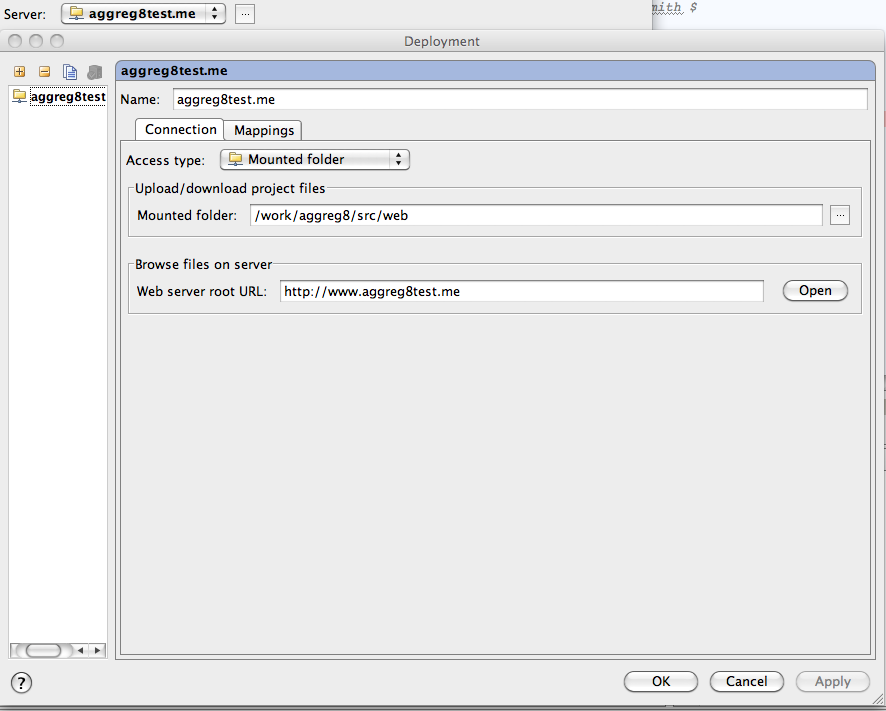
Here is the server configuration


and the mappings tab:


I made sure my VM Apache was restarted:
/etc/init.d/apache2 restart

Now to debug, I could click the Run > Debug option in PHPStorm.

I hope this helps someone. Any questions, please email nathan [ at ] eit dot co dot nz.


Monday, June 14, 2010

GIT with CruiseControl

To get GIT to work as a plugin within cruisecontrol, you need to configure like this:

<plugin name="git" classname="net.sourceforge.cruisecontrol.sourcecontrols.Git" />

This is not obvious when looking here:
http://jpablobr.com/php-staging-environment-for-continuous-integration-part-2/

The resulting config.xml file will look like this:


<cruisecontrol>
<project name="socialgo" buildafterfailed="true">

<listeners>
<currentbuildstatuslistener file="logs/${project.name}/status.txt"/>
</listeners>

<modificationset quietperiod="60">
<git localWorkingCopy="projects/${project.name}/source/"/>
</modificationset>

<plugin name="git" classname="net.sourceforge.cruisecontrol.sourcecontrols.Git" />

<bootstrappers>
<antbootstrapper anthome="apache-ant-1.7.0" buildfile="projects/${project.name}/build.xml" target="build" />
</bootstrappers>

<schedule interval="300">
<ant anthome="apache-ant-1.7.0" buildfile="projects/${project.name}/build.xml"/>
</schedule>

<log>
<merge dir="projects/${project.name}/target/test-results"/>
</log>

<publishers>
<onsuccess>
<artifactspublisher dest="artifacts/${project.name}" file="projects/${project.name}/target/${project.name}.jar"/>
</onsuccess>
</publishers>

</project>
</cruisecontrol>


Wednesday, March 24, 2010

Calum's website

Calum Ryan ( @zizzfusion ) is offering a free pizza voucher prize - and although I love pizza, I'm always interested in commenting or helping on any website designs that people ask for feedback about.

The website is: http://www.zizzfusion.com/

The things that I like:
- that smokey look at the top
- easy to see fresh articles from the homepage - with comment count as bubbles.
- simple top right navigation
- a contact form on the homepage
- flickr photos
- screen shot popup - love these things.

The things I would change (if I had time - and yeah, I never do have time so I understand):
- the positioning of the popup about this competition - overlays the logo - could do with a cookie check to see it doesn't show again when refresh the homepage, but ideally slide it in, and position it so it doesn't look like an overlay banner advert.
- when viewing on 1024*768 there is no margin and slightly to wide, so the nice circle to the right is cut off and a unnecessary scroll bar appears.
- the logo is a bit flat - could do with some backdrops and colour contrast
- the logo does not appear on all pages - so I could be mistaken for looking at another website when going to the portfolio page
- portfolio page calls "articles" "tutorials"
- navigation doesn't show which page you are currently on
- Article category buttons only work for text area - expect the whole button to be clickable
- screen shot popup needs a close button at the top.
- could enhance the portrait picture on the portfolio page as it's very dark.
- description in meta tags could be stuffed with more keywords like "design, webdesign, london etc.. - not exceeding 156 characters of course.


With a few tweaks this could be a great website!

Wednesday, December 30, 2009

Ignoring files in a GIT repository

To ignore a file:

if the project is /work/project
you have /work/project/.git folder
If you want to have the files ignored over all pages, create a file called:
/work/project/.gitignore and put one line for each file, relative to /work/project, eg:
I have a /work/project/src/cache folder which I want to have its contents ignored (any files within the /work/project/src/cache folder, so I put in .gitignore:
src/cache/*

then make sure there are none of these files in the cache folder already:
git rm --cached src/cache/*

Then, the standard commit - note, you may need to directly add .gitignore:
git add .gitignore
git commit
git push projecthostnamehere branchnamehere

For the same project, if you want to ignore on just this local copy, edit:
/work/project/.git/info/exclude

Note, you don't have to add this change, but you do need to rm anything that was there before, as it only ignores it once it is removed (see git rm --cached src/cache/* above)

Thursday, June 18, 2009

Tuesday, February 17, 2009

eBay API overdrive

Lately I've been doing a lot with the eBay APIs and more specifically the trading APIs for listing items. (I've also used selling apis a lot in the past when working with the ebay deals placements while at eBay). Some of the quickest results can be acheived with the use of pre-entered products found using isbn, ean or reference numbers. The trick when comparing with existing competitor items and trying to re-find these numbers, is to find the item using individual trading api calls and your token, as the shopping APIs don't often give quite enough detail about things like Ean numbers.

I'll possibly be showing some of my out-of-normal-hours work at this months eBay seller Meetup, happening this thursday. So much is happening in the ecommerce and ebay space at the moment, so it will be good to discuss the month over a beer. If your interested in eBay selling, RSVP and come along, it's every month on the third Thursday of each month -http://Meetup.com/ebayuk